
1 video
200 credits
$8.99 one-time
- Added to your Vismuse balance
- Credits never expire
Use the Bad Times AI Video Generator to put yourself in the viral kitchen performance from one photo. Make a 15- or 30-second vertical video with the original sound.
One clear photo of the performer
The Bad Times trend turns a dramatic kitchen argument into a performance set to Imael Angel’s Bad Times. The performer puts their hands up, turns aside, then walks straight up to the camera for the close-up.
Your portrait supplies the face, hair and outfit. The template supplies the kitchen, gestures and soundtrack. Here is the portrait Vismuse used for the 15-second example.
Watch the example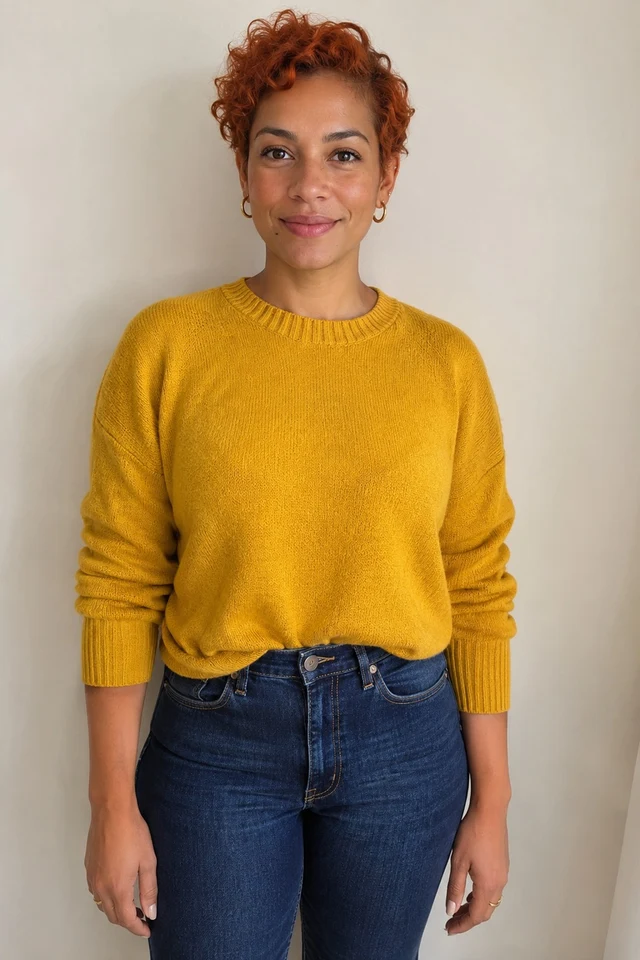 Source photo
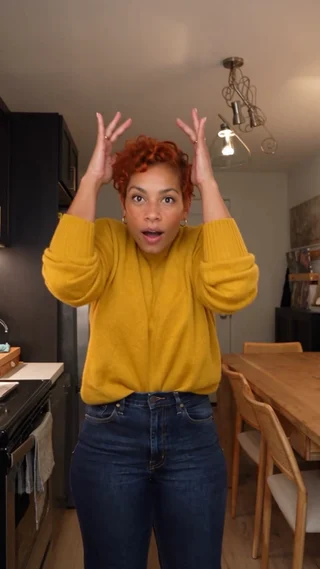 AI-generated result
Choose a sharp portrait of one person with their face and upper body visible.
Pick a 15- or 30-second cut. Add an optional instruction if you want the AI to keep a detail from your portrait.
Sign in and generate with paid Vismuse credits. Watch the finished clip, then download your vertical MP4.
Face the camera or turn slightly. Use even lighting and keep hair, eyes and glasses visible.
Include the shoulders and upper body so the template has a clearer reference for clothing during the gestures.
Watch the full clip to check facial details, hand movement and how the soundtrack lines up before you share it.
Top up your Vismuse balance with a one-time credit pack.
The 1 video pack includes 100 bonus credits, for 300 total. Video counts are estimates and vary by clip length.
200 credits
$8.99 one-time
1,000 credits
$19.99 one-time
3,000 credits
$39.99 one-time
It’s a short video trend built around a theatrical kitchen argument set to Imael Angel’s Bad Times. The AI template puts the person from your photo into the performance.
Use a sharp, well-lit photo of one person with their face and upper body visible. The studio accepts JPG, PNG or WebP up to 10 MB. The preset is designed for a single person.
The preset supplies the scene, the moves and the matching soundtrack. Upload your photo and generate, or add an optional instruction to keep a detail such as your glasses.
Pick a 15- or 30-second edit. Both are vertical 9:16 videos you can download as MP4s for TikTok, Reels or Shorts.
You can watch both Vismuse examples for free. Creating a video requires a Vismuse account and eligible paid credits. The studio checks your balance for the selected edit.
When generation finishes, play the clip on its task page and select Download MP4. Open Recents or My videos from your account menu to find it again.
The studio keeps your draft in this browser while you sign in or buy credits. When you submit an eligible generation, it sends your photo to Vismuse to create your video.
Choose one portrait and step into the kitchen scene.